
When an order is placed, the buyer account will remember that address for all future orders
You can EDIT the address for an individual order, but that will not affect the default address chosen in checkout.
Question: How do I fix a Buyer account that has incorrect address?
Issue: first order is placed with incorrect address
Temp solution: updating address on order, but that will only update it for THAT cart.
Permanent Solution:
- Login as buyer
- Click on the SETTINGS cog
- Click on ADDRESSES (n.b: this is only visible to admins)
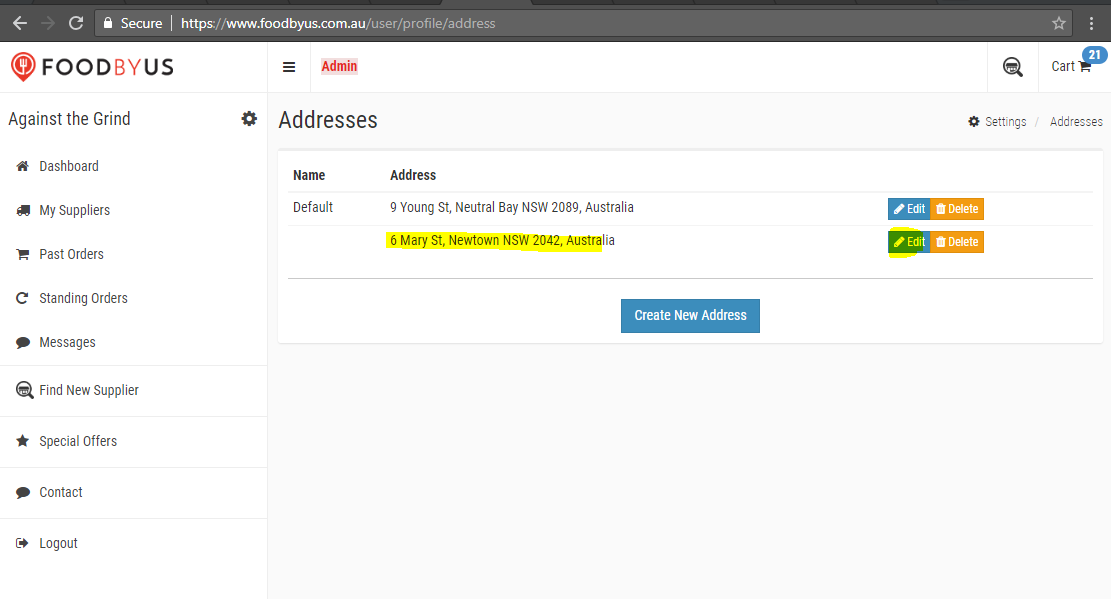
- Edit the addresses listed here, so it just has the REAL address (i.e: find the incorrect one and fix it)
- Check what you have done – go to the MY SUPPLIERS page and add items to cart and see what address defaults in the checkout. Ensure it’s the correct one.
- If it is, then its fixed for good.
- IF THERE ARE MULTIPLE ADDRESSES IN THE LIST - and one is wrong, you can delete it. Checkout will then fallback to the other one - BUT before you delete
- Make sure there are no settings/lockboxes etc saved for that address in the Buyer CRM
In the below example, the NEWTOWN address is incorrect - so that is the one we want to edit.
Comments
0 comments
Article is closed for comments.